
Best AI Homework Helper Apps: Which One Actually Helps You Learn?


We tested six popular AI homework helper apps to see which ones actually help students understand concepts instead of just providing quick answers, comparing features, and real learning outcomes.
Introduction
Look, I’ll be honest with you. When I first heard that 84% of high school students were using GenAI tools for homework assignments (according to the College Board‘s May 2025 research), I had two thoughts. I said to myself, “Wow, that’s a HUGE percentage,” but most importantly, “Are they actually learning anything?!”
Here’s the thing though. AI homework helpers aren’t going anywhere, whether we like it or not! Your kids are probably using them, because students definitely are. But not all these apps are built the same. Some just spit out answers and call it a day. Others actually walk you through problems step-by-step, like a patient tutor sitting right next to you.
So I spent the last few weeks testing the most popular AI homework helper apps out there. I threw a few different subjects at them, from algebra to essay writing. Some impressed me. And some, well, let’s just say they need work. And honestly? The results surprised me more than once.
If you’re trying to figure out which AI homework helper is worth your time (or your kid’s time), stick around. I’m breaking down what actually works and what’s basically just a glorified Google!
Best Overall in a Glance
ChatGPT
Best For: Students who need quick explanations with all types of subjects
- Pros:
- Free version available with solid features
- Explains concepts in simple, easy-to-understand language
- Works for almost any subject or topic
- Cons:
- Can give incorrect answers without warning
- Need correct prompting to get the desired results
- Requires careful fact-checking
Photomath
Best For: Visual learners who need detailed math solutions
- Pros:
- Shows every single step of math problems
- Works by taking photos of handwritten or printed problems
- Includes multiple solution methods for same problem
- Cons:
- Premium features require subscription
- Can struggle with messy handwriting
Socratic/Lens by Google
Best For: High school students looking for concept explanations
- Pros:
- Completely free with no hidden costs
- Provides visual aids and diagrams
- Links to trusted educational resources
- Cons:
- Sometimes provides too much information at once
- Limited to basic subjects
What Makes a Good AI Homework Helper (And What Doesn’t)
Here’s the thing. Most kids (and honestly, plenty of adults) just want the answer. I get it, we’ve all been there! You’re staring at problem 17 on your algebra homework at 10 PM, and you just need to move on with your life.
But there’s a huge difference between an app that spits out “x = 7” and one that actually shows you why x equals 7. The best AI learning tools don’t just hand you answers. They break down the steps so you can actually do it yourself next time.
My nephew went down that road once. He was using one of those quick-answer apps, and sure, he finished his homework in like 20 minutes. But when the test came around? Total disaster! He had no idea what he was doing because the app never taught him anything.
Good AI helpers make you think. They ask questions back. They show you where you went wrong. The sketchy ones just give you a fish instead of teaching you to fish, you know?
Now, you might ask, why getting instant answers isn’t the same as understanding?
Look, I’m not going to pretend instant answers aren’t tempting. Because they are! But here’s what I’ve seen happen over and over. Students get dependent on them, and then they’re completely lost when they can’t use their phone.
Real learning sticks in your brain. You can apply it to new problems. You can explain it to someone else. When an app just hands you the answer, none of that happens.
Think about it like GPS. Sure, it gets you there, but if you use it every single time, you never actually learn the route. Same deal with homework helpers that don’t explain anything.

But still, you wanna know how good AI helpers explain the “why” behind solutions?
The apps worth using don’t just show you the final answer. They walk you through each step like a patient tutor would.
Some break it down with color-coded explanations. Others use simple language to explain complex concepts. The really good ones let you click on any step and get more details if you’re confused.
Last point here, I’ve noticed the best ones also connect the current problem to similar examples. So, let’s say you’re stuck on factoring polynomials. They might say something like, “Remember how we factored simpler expressions? This is the same idea, just with more terms.”
Breaking Down the Top 7 AI Homework Helper Apps
ChatGPT
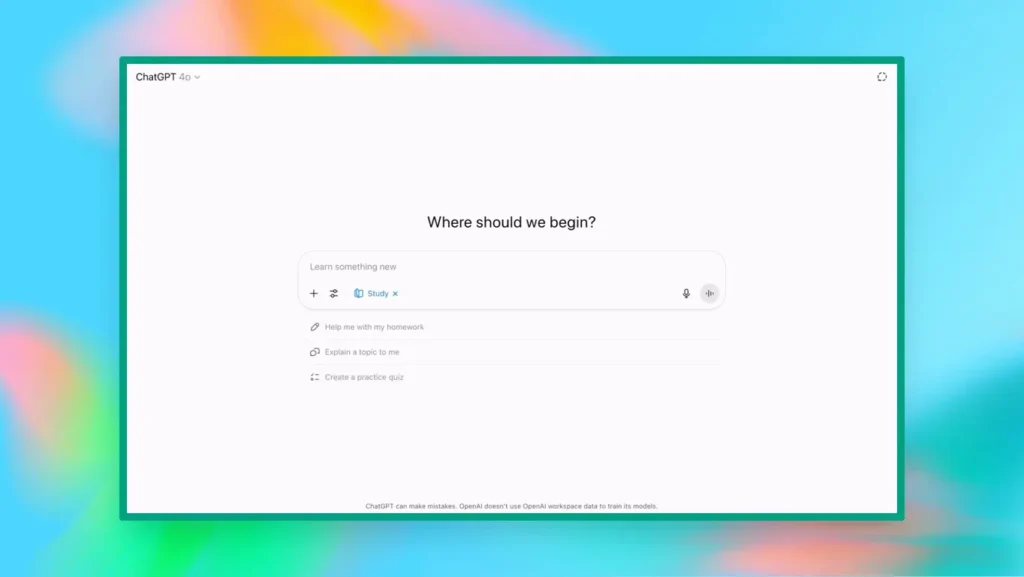
Best for: Students who need help with many different subjects and want conversational explanations that feel like talking to a smart friend. Works great for everything from math problems to essay feedback to science concepts.
Pros:
- Explains things in whatever way makes sense to you
- Can adapt to your learning style on the fly
- Free version is actually pretty capable
- Great for brainstorming and understanding concepts
Cons:
- Sometimes confidently wrong about facts
- Can be wordy when you just need a quick answer
I use ChatGPT constantly for my business, but I’ve also tested it pretty thoroughly for homework help. For math, it’s solid in explaining concepts, but sometimes makes calculation errors. Always double-check the actual numbers.
Use ChatGPT when you’re genuinely confused about a concept and need someone to explain it differently. It’s like having a study buddy who never gets tired of your questions. It’s also great for “is my thinking correct here?” type questions. Like, you solved the problem and want to check your logic.
If you wanna get quality results, be specific about what you don’t understand. Instead of saying, “help me with this math problem,” try “I’m stuck on factoring this equation; I don’t get how to find which numbers multiply to give me X and add to give me Y.”
Photomath
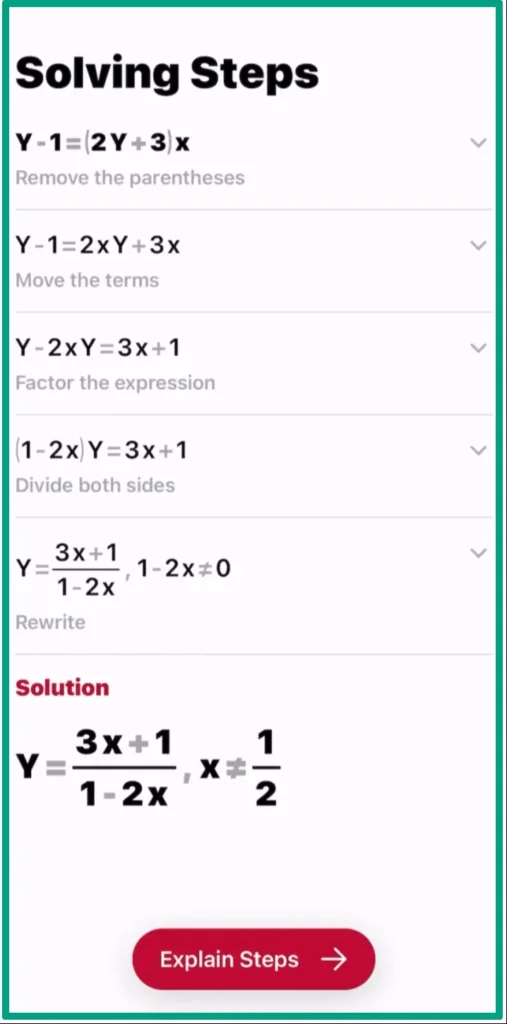
Best for: Visual learners who want to snap a photo of their math problem and see step-by-step solutions. Perfect for algebra, geometry, and basic calculus.
Pros:
- Camera feature works surprisingly well
- Shows multiple solving methods
- Clean, easy-to-follow interface
- Great explanations for each step
Cons:
- Limited to math only
- Struggles with really messy handwriting
- Some advanced topics require premium
Photomath is basically magic for math homework. You point your camera at a problem, and boom, it reads it and solves it.
But here’s the cool part. It doesn’t just give you the answer. It shows you every single step, color-coded and explained. For someone like my nephew who learns better by seeing things than hearing them, this works amazingly.
The visual breakdown makes it easier to spot where you’re getting confused. Like, “oh, I get steps 1-3, but step 4 is where I lose it.” Then you can focus on understanding just that part.
Socratic/Lens by Google
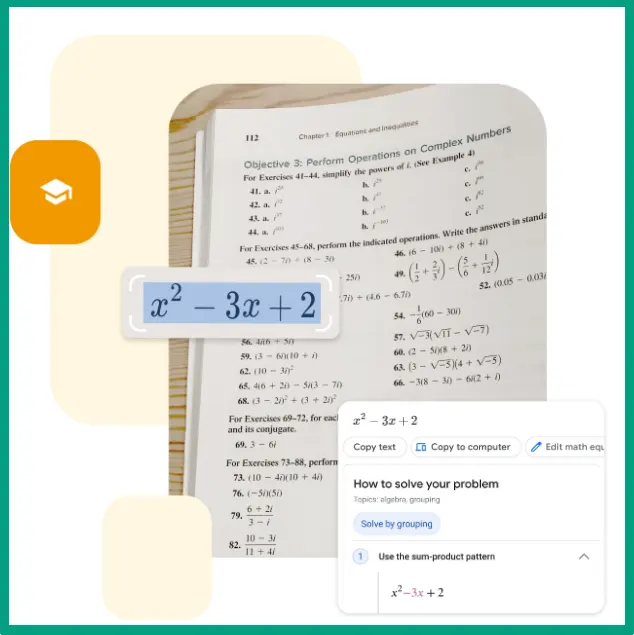
Best for: Students who want to understand the broader concept, not just solve one problem. Great for connecting topics to real-world examples and additional resources.
Pros:
- Free and no hidden costs
- Connects you to helpful videos and articles
- Works with many subjects
Cons:
- Less detailed than specialized apps
- Sometimes gives you too many resources
- Explanations can be pretty basic
- Not as interactive as ChatGPT
Socratic (now Google Lens) takes a different approach than most homework helpers. Instead of just solving your specific problem, it tries to teach you the underlying concept.
A colleague of mine uses this for her kids. They take a photo of their homework question, and Socratic shows them relevant videos, articles, and explanations. It’s more like a smart search engine than a problem solver.
Here’s what’s actually pretty smart about Socratic. It pulls from high-quality educational sources instead of just making up answers. You might get a video from Khan Academy, an article from an edu website, and a step-by-step solution from their own database. It curates instead of creates.
For younger students who need to build foundational understanding, this is actually better than apps that just give answers. Though it does mean more clicking around to different resources.
Khan Academy’s Khanmigo

Best for: Students who want a tutor-style experience that guides them to figure out answers themselves instead of just giving them away. Built specifically to help you learn, not just complete homework.
Pros:
- Actually teaches instead of just answering
- Integrates with Khan Academy’s massive lesson library
- Socratic method approach
- Good at identifying knowledge gaps
Cons:
- Requires subscription
- Can be frustrating when you just want the answer
- Sometimes too slow for time-crunched students
Okay, so Khanmigo is different. It’s specifically designed NOT to just hand you answers! Instead, it asks you questions to help you figure it out yourself.
Like, you ask “what’s the answer to this equation?” and it responds with “what’s the first step you’d take to isolate the variable?” At first, this might drive some students crazy! But trust me, they actually start understanding the material instead of just copying answers.
It’s basically an AI math tutor that uses the Socratic method. Which is great for learning, but annoying when you’re rushing through homework at midnight.
If you’re already using Khan Academy (which is free and honestly amazing), Khanmigo makes perfect sense. It knows what lessons you’ve completed and where you’re struggling. And it can pull up relevant videos and practice problems based on what you’re asking about.
Quizlet’s Q-Chat
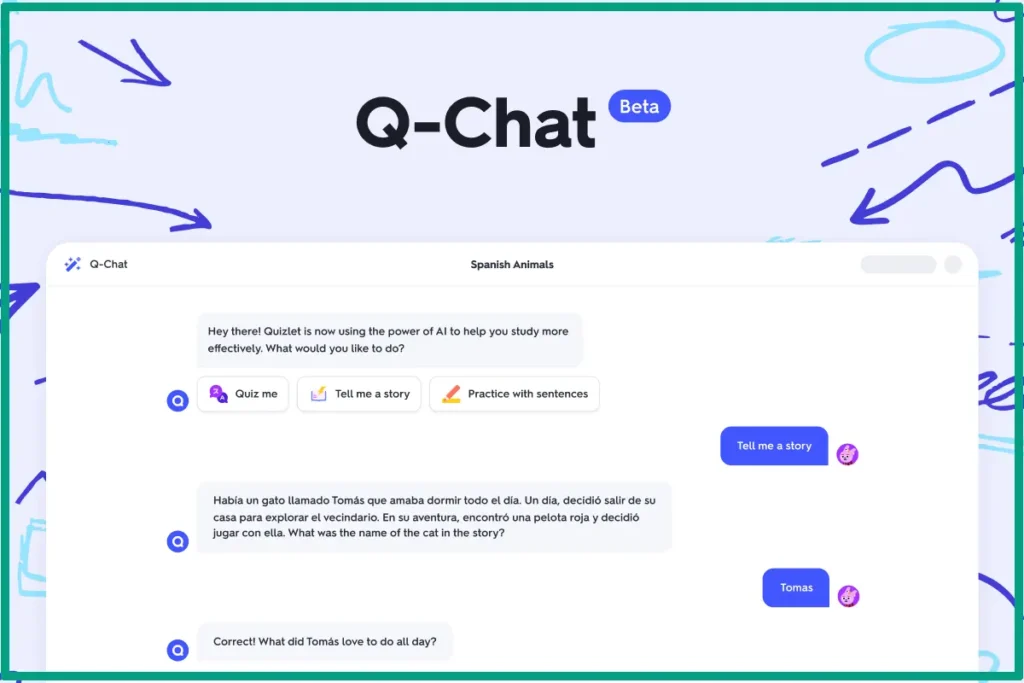
Best for: Test prep and memorization-heavy subjects. Great for turning your study guides into interactive quizzes and flashcard-style learning.
Pros:
- Works great with existing Quizlet sets
- Good for memorizing facts and definitions
- Interactive quiz format keeps you engaged
- Lots of user-created study materials
Cons:
- Not built for complex problem-solving
- Limited to subjects that need deep understanding
- Relies heavily on memorization vs. comprehension
- Premium features required for best experience
Q-Chat takes Quizlet‘s flashcard approach and adds an AI conversation layer. You can quiz yourself, and it adapts the questions based on what you’re getting wrong.
Let’s say you wanna use Quizlet for vocab and basic facts. Q-Chat makes it more dynamic. Instead of just flipping cards, you’re having a back-and-forth about the material. It’s pretty good at catching when you’re close but not quite right and helping you get there. Better than traditional flashcards for sure.
A friend of mine used it to study for her real estate license exam. All those random facts and rules you need to memorize, Q-Chat turned it into an interactive game basically. It’s one of the best free AI study tools for this specific type of learning.
Brainly
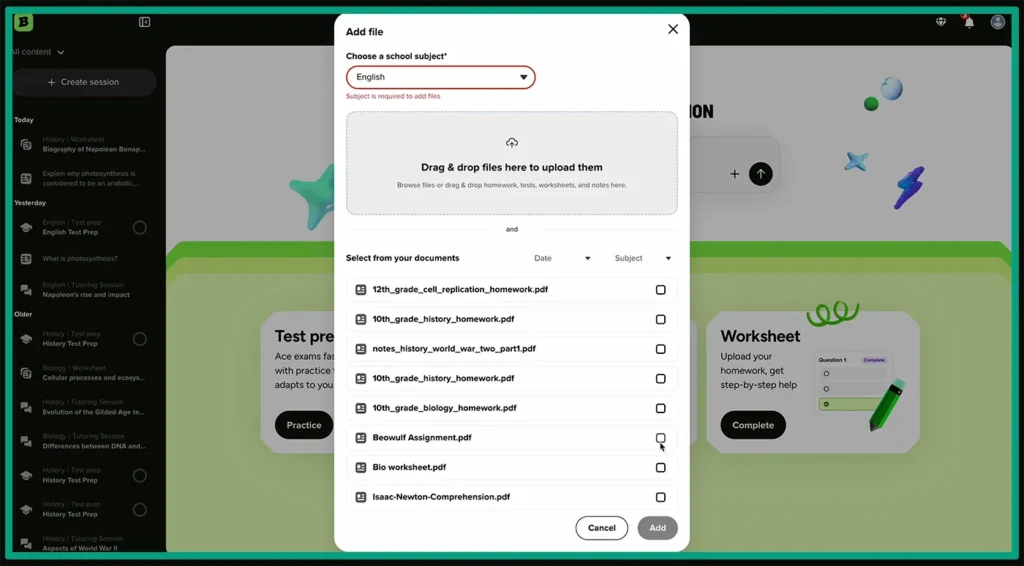
Best for: Getting multiple perspectives on tough problems and seeing how other students approached similar questions. Good for when you want community input, not just AI answers.
Pros:
- Free to use for basic features
- Real people provide answers, not just AI
- Can see multiple solution methods
- Huge database of already-answered questions
Cons:
- Answer quality varies wildly
- Response time isn’t instant
- Some answers are just wrong
- Can feel like the blind leading the blind!
Brainly is less of an AI tool and more of a community platform where students help each other. You post your question and other students (or sometimes teachers) answer it.
The cool part is that you often get different approaches to the same problem. But the sketchy part is that those approaches might be wrong!
I tested it with some basic algebra problems, and honestly, the answers were hit or miss. Some were great, detailed, and correct. Others were… not!
My rule of thumb is, if an answer on Brainly has lots of “thanks” and positive ratings from other users, and it’s from a verified contributor, it’s probably right. But always double-check.
How to Actually Use AI Homework Helpers Without Cheating Yourself
Step 1: The struggling part
Okay, this is the most important thing. Don’t even open the AI app until you’ve tried the problem yourself for at least 5-10 minutes.
I know it’s tempting to just skip to the answer. But here’s what I’ve noticed. When you struggle with something first, the explanation actually sticks. Your brain is primed to learn because you’ve already engaged with the problem.
Even if your attempt is completely wrong, that’s fine. At least you tried. Later on, the AI can then show you specifically where your thinking went off track.
Step 2: Use AI to explain concepts you’re stuck on
This is the sweet spot for AI homework helpers. Not solving individual problems, but explaining the concept so you can solve problems yourself.
Like, instead of asking “what’s the answer to problem 15,” ask “can you explain how logarithms work?” Then use that understanding to solve problem 15 yourself. This is the part most people mess up, and they’re wondering why they’re not learning anything!

Step 3: Ask “why” and “how” questions, not just “what’s the answer!”
The quality of your questions determines the quality of your learning. “What’s the answer?” is a terrible question! “Why does this method work?” is a great question.
“How do I know when to use this formula?” is even better. You’re learning the thinking process, not just the answer to one specific problem.
And that’s basically it! These tools are easy to use and help a lot if used correctly. But here are more guides if you decide to dive deeper into this:
- I’ve seen AI homework tools for parents work well when the kid can use the AI, but they have to explain what they learned afterward. If they can’t explain it, they didn’t actually learn it!
- Next is the AI ethics in education conversation that is still evolving. Unfortunately, nobody has it totally figured out yet. However, those extra explanations can be helpful.
- And finally, you can use an AI study planner to organize your time, but actually do the work yourself. Let AI help you figure out what to study and when, but don’t let it do the actual studying for you!
FAQ
Q: Is using AI homework helpers considered cheating?
It depends on how you use them. Using AI to understand a concept or check your work is totally fine. But copying AI-generated answers without understanding them? That’s cheating yourself out of learning, and most schools consider it academic dishonesty.
Q: Which AI homework helper is best for math?
Photomath takes the crown for math. It shows detailed step-by-step solutions and explains the logic behind each step. For word problems or algebra, ChatGPT and Khan Academy’s Khanmigo are also solid choices.
Q: Are free AI homework helpers as good as paid ones?
Sometimes, yeah. ChatGPT’s free version and Socratic are surprisingly capable. But paid versions like Photomath Plus and Khanmigo offer better explanations, more features, and fewer limitations. It really depends on your needs.
Q: Can AI homework helpers work for all subjects?
Most general AI tools like ChatGPT handle multiple subjects pretty well. But specialized apps like Photomath only do math. For best results, use subject-specific tools for complex topics and general AI for everything else.
Q: How do I know if the AI’s answer is actually correct?
Always double-check important information. Cross-reference with your textbook or ask your teacher. Many AI tools can confidently give wrong answers! Use multiple sources, and if something feels off, it probably is.
Conclusion
So, here’s where we land. The best AI homework helper isn’t actually about finding the “perfect” app. It’s about figuring out which tool better help at how you learn.
The real trick is using these tools the right way. They’re meant to be your study buddy, not your replacement brain. Try the homework yourself first. Get stuck. Then use AI to figure out where you went wrong and why. That’s when actual learning happens.
Look, AI homework helpers are here to stay. Schools are still figuring out their policies, parents are still nervous, and students are already using them daily. But if you treat these apps like tutors instead of answer machines, they can actually make you better at learning. Just don’t let them think for you!
Ready to try one out? Start with the free versions, see what works best for you, and go from there. Your grades (and your actual understanding) will thank you!